
Meta Instancer: Difference between revisions
NextinHKRY (talk | contribs) No edit summary |
mNo edit summary |
||
| (One intermediate revision by one other user not shown) | |||
| Line 1: | Line 1: | ||
{{Notice|type=warn|content=This Addon is not yet finished, as there are some issues with exporting rotations and the import function has not yet been implemented.}} | |||
{{ToolInfobox|title=Meta Instancer|author=Hedgeturd|website=https://github.com/Hedgeturd/MetaInstancer-Blender/|image=|download=https://github.com/Hedgeturd/MetaInstancer-Blender/releases/latest}} | {{ToolInfobox|title=Meta Instancer|author=Hedgeturd|website=https://github.com/Hedgeturd/MetaInstancer-Blender/|image=|download=https://github.com/Hedgeturd/MetaInstancer-Blender/releases/latest}} | ||
'''Meta Instancer''' is a Blender addon to modify meta-instancer files (.mti) from '''Hedgehog Engine 1''', which are primarily used for grass in levels. | '''Meta Instancer''' is a Blender addon to modify meta-instancer files (.mti) from '''Hedgehog Engine 1''', which are primarily used for grass in levels. | ||
| Line 22: | Line 23: | ||
Once you're ready to export, make sure to go back to your Particle Emission Settings and reduce the Hair Length to 0, then go to '''File > Export > Meta Instancer (.mti)''' and finally name and export your MTI file. | Once you're ready to export, make sure to go back to your Particle Emission Settings and reduce the Hair Length to 0, then go to '''File > Export > Meta Instancer (.mti)''' and finally name and export your MTI file. | ||
[[Category:Tools]] | |||
Latest revision as of 21:13, 1 May 2026
Meta Instancer is a Blender addon to modify meta-instancer files (.mti) from Hedgehog Engine 1, which are primarily used for grass in levels.
Usage
Scene Setup
Make a surface which has a Particle System set on it, use the settings from this image.

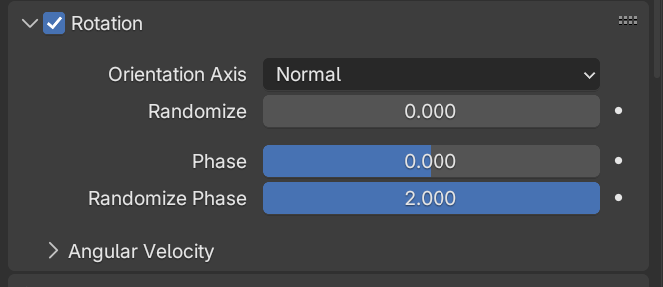
To have more randomized patches of grass, use these settings below.
-
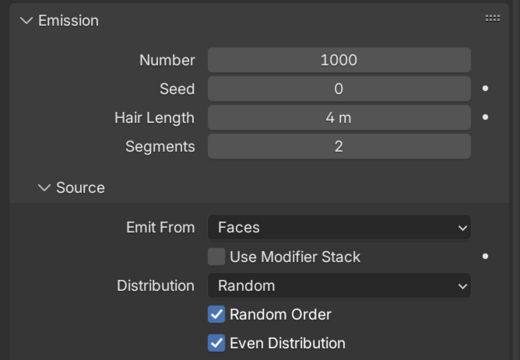 Take note here that "Hair Length" is 4 metres, only use this value for previewing!
 -


Painting
If you want more control over the placement you can add weight paints to the Particle Settings, use the settings below; "Group" being the vertex group that will be used to paint the grass onto the surface. After you set this up, you can now begin painting.

Once you're ready to export, make sure to go back to your Particle Emission Settings and reduce the Hair Length to 0, then go to File > Export > Meta Instancer (.mti) and finally name and export your MTI file.